How Photoshop Editors Improve Image Quality
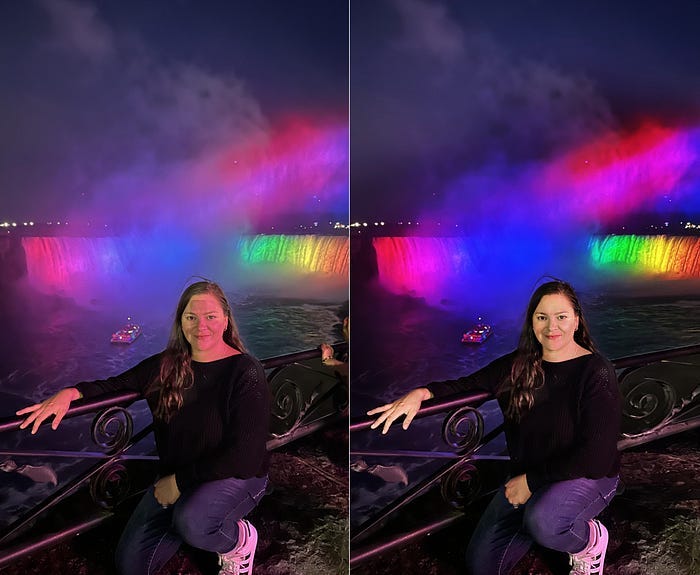
If you’ve ever looked at a photo and thought, “this just doesn’t look right,” you’re not alone. Bad lighting, blurry focus, dull colors — these problems kill great photos every day. That’s exactly where understanding how Photoshop editors improve image quality becomes so important. Whether you’re a business trying to sell products online or an individual who wants to preserve a precious memory, professional editing can completely change the story a photo tells.
What Does a Photoshop Editor Actually Do?
Most people think photo editing is just slapping a filter on an image. It’s not. A skilled Photoshop editor analyzes every layer of an image — the lighting, the color balance, the sharpness, the noise — and fixes each one carefully. It’s more like surgery than decoration.
A professional image editing workflow involves dozens of micro-decisions. Where’s the light source? Is the skin tone accurate? Does the background distract from the subject? These questions guide every move an editor makes.
The goal is simple: turn dull images into professional photos that grab attention and hold it.
How Photoshop Editors Improve Image Quality: The Core Techniques
Color Correction
Color is one of the first things viewers notice, even if they don’t consciously realize it. Photos taken in poor lighting often have an unpleasant color cast — too yellow, too blue, or just flat. Color correction fixes this by adjusting white balance, hue, saturation, and luminance.
A good editor doesn’t just “fix” colors. They enhance them in a way that feels natural. Skin tones look warmer, skies look more vivid, and products look exactly as they do in real life. This is one of the most impactful ways to make photos look high quality without dramatically altering the image.
Image Sharpening
Blurry photos are one of the most common complaints photographers and clients have. The good news? They’re often fixable. Learning how to sharpen blurry images in Photoshop is a foundational skill for any serious editor.
Photoshop offers tools like Unsharp Mask, Smart Sharpen, and the High Pass filter technique. Each one works differently depending on the type of blur — motion blur, out-of-focus softness, or compression artifacts all need different treatment. How professionals edit blurry photos isn’t a one-size-fits-all process. It requires judgment and a trained eye.
A professional image enhancement service won’t just slam the sharpening slider to the right (which creates ugly halos). They apply selective sharpening only where it’s needed, keeping textures crisp without destroying image quality.
Noise Reduction
Low-light photos taken on smartphones or older cameras often come out grainy. That grainy texture is called digital noise, and it makes images look amateurish. Noise reduction in Photoshop smooths out that grain while trying to preserve important details.
This is where a lot of DIY editing goes wrong. Over-reducing noise turns a photo into a waxy, plastic-looking mess. The best Photoshop techniques for image enhancement involve balancing noise reduction with sharpness preservation — a delicate trade-off that takes experience to get right.

Lighting Adjustment
Even a well-composed photo can look flat if the lighting’s off. A Photoshop expert can dodge (brighten) shadows, burn (darken) highlights, and balance the exposure across the entire frame.
This kind of lighting adjustment can rescue photos that seemed too dark or overexposed to be usable. It’s one of the best ways to improve low quality photos professionally, especially when the original image has good composition but poor exposure.
Background Cleanup
Distracting backgrounds ruin otherwise great photos. A cluttered office wall, a random stranger in the shot, an ugly power line crossing the sky — these things pull the viewer’s attention away from the subject.
Background cleanup services remove or replace distracting elements. This is especially critical for product photography. If you’re selling something online, the background should be clean, consistent, and professional. Messy backgrounds reduce buyer confidence, and that directly affects sales.
A great photo retouching service will make the background work for the image, not against it.
Skin Retouching
For portraits, skin retouching is one of the most requested services. This goes beyond just removing blemishes. High-end retouching includes smoothing skin texture, reducing shine, evening out skin tone, and sometimes reshaping features — all while keeping the person looking like themselves.
Skin retouching done badly is obvious and unflattering. Done well, it’s invisible. The subject looks like a polished, well-rested version of themselves — not a plastic doll.
Why Businesses Need a Professional Photoshop Editing Service
There’s a direct line between image quality and revenue. Studies consistently show that product photos are one of the top factors in online purchasing decisions. If your product images look dull, blurry, or unprofessional, potential customers won’t trust your brand enough to buy.
A professional photoshop editing service helps businesses improve product photos for better sales by creating clean, consistent, high-quality visuals across every listing or marketing material.
This is especially true for:
- E-commerce brands with large product catalogs
- Real estate agencies that need polished property photos
- Fashion labels that need flawless model shots
- Restaurants that need food photography that actually looks appetizing
The return on investment from great imagery is real and measurable.
How to Improve Image Quality in Photoshop: Can You Do It Yourself?
Technically, yes. Photoshop is available to anyone, and there are thousands of tutorials online. But knowing how to improve image quality in Photoshop and being good at it are two very different things.
Professional editors have years of practice, a calibrated monitor, a sharp eye for detail, and an understanding of how images will look across different screens and print formats. DIY editing usually leads to over-processed results — too much sharpening, unnatural colors, or clunky background removal.
If you need a handful of images done quickly and you’re comfortable with the tools, go for it. But if consistency, quality, and volume matter — and they usually do for businesses — a photoshop expert service is worth every penny.

Photoshop Service: What to Look for When Hiring an Editor
Not all editing services are the same. When you’re looking for a reliable photo enhancement partner, here’s what to consider:
Portfolio quality. Look at their before-and-after examples. Do the edits look natural? Are the colors accurate? Is the sharpening clean?
Turnaround time. Especially for businesses with ongoing needs, a service that can deliver on time is non-negotiable.
Range of services. Good editors offer everything from basic color correction to complex compositing. If they can only do one thing well, they may not be the right fit for varied projects.
Communication. Can you give feedback? Will they revise? A responsive service makes the whole process smoother.
If you need product photo retouching services specifically, make sure the provider has experience with your type of products and understands your brand’s visual style.
Can Old or Low-Quality Photos Be Saved?
Absolutely. Old photos, scanned prints, and low-resolution images can all be improved — though there are limits. Photoshop can’t invent detail that was never captured. But it can reduce grain, correct color fading, restore contrast, and sharpen edges that have blurred over time.
This is a popular service for families wanting to restore old family photos and for businesses that have legacy product imagery they need to modernize.
The key is finding an editor with restoration experience. It’s a different skill set than general retouching, and it requires patience and a careful hand.
FAQ: How Photoshop Editors Improve Image Quality
Can Photoshop really improve image quality?
Yes, significantly. Photoshop offers tools for sharpening, noise reduction, color correction, exposure adjustment, and much more. In the hands of a skilled editor, even a mediocre photo can be transformed into something professional-looking.
How do professionals sharpen blurry images?
Professionals use tools like Smart Sharpen, Unsharp Mask, and High Pass filter techniques. The choice depends on the type and severity of the blur. They apply sharpening selectively and carefully to avoid unwanted side effects like halos or over-processing.
What tools do Photoshop editors use for image enhancement?
The most commonly used tools include Curves, Levels, Hue/Saturation, Camera Raw Filter, Clone Stamp, Healing Brush, and various sharpening filters. High-end work also involves frequency separation for skin retouching and luminosity masks for precise exposure control.
Is professional photo editing worth it for businesses?
Yes, especially for e-commerce and marketing. High-quality images directly influence customer trust and purchasing decisions. The cost of professional editing is almost always outweighed by the impact on conversions and brand perception.
Can old low-quality photos be improved?
Yes, in most cases. Faded colors, dust, scratches, and blur can all be improved through photo restoration and enhancement techniques. The results depend on the original image quality, but skilled editors can achieve impressive results even with very old or damaged photos.
Conclusion: Don’t Let Bad Images Hold You Back
Understanding how Photoshop editors improve image quality is just the first step. The real value comes from acting on it. Whether you need color correction on a few portraits or a full-scale image enhancement service for your entire product catalog, working with a professional makes a difference you can actually see.
Great images don’t happen by accident. They’re built, layer by layer, with skill and intention. And the right photo retouching service will help you create clean and sharp visuals that represent your brand at its absolute best.
Don’t settle for average photos. Your work deserves better — and so do your customers.


Comments
Post a Comment